
Classify whole images with flags
Unofficial preview. Docsbook assembled this page from the public
wkentaro/labelmeREADME.mdandexamples/directory. It is not affiliated with, endorsed by, or maintained by the Labelme project. The official documentation lives at labelme.io/docs.
Not every task needs a region. Classification asks what the whole picture is, and data cleaning asks whether the picture is usable at all. Labelme handles both with flags — checkboxes attached to the image rather than to a shape.
Annotate with flags#
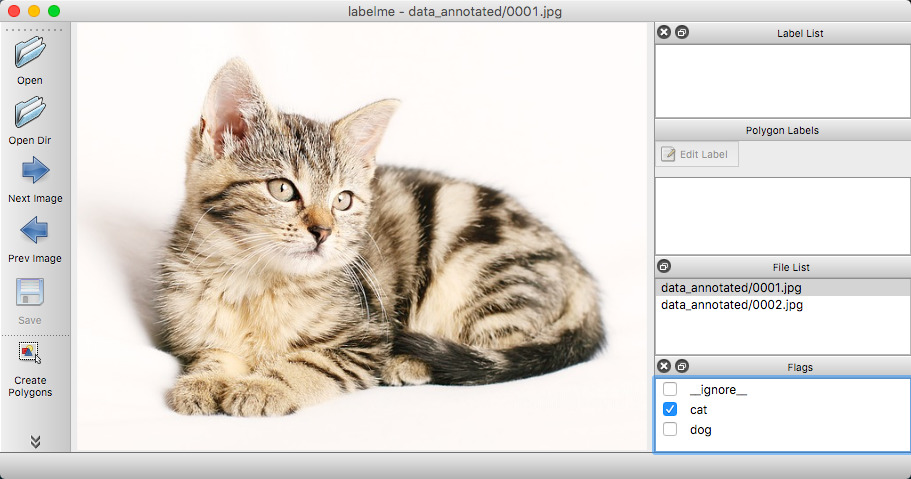
labelme data_annotated --flags flags.txt--flags takes either a comma-separated list or a file containing one flag per line. Labelme shows them as checkboxes; you tick the ones that apply and move to the next image without drawing anything.
Where flags land in the JSON#
Image-level flags are written to the top-level flags object of the annotation file, as a map of flag name to boolean:
{
  "version": "4.0.0",
  "flags": {"cat": true, "dog": false},
  "shapes": [],
  "imagePath": "cat.jpg",
  "imageHeight": 480,
  "imageWidth": 640
}
A classification-only annotation has an empty shapes list. That is the shape of the file to expect when you read it back.
Per-label flags are a different thing#
--flags attaches to the image. --label-flags attaches to shapes, matched by a regular expression on the label:
labelme data_annotated --labels labels.txt \
  --label-flags '{.*: [occluded, truncated], person: [male]}'
Here every shape can be marked occluded or truncated, and shapes labelled person additionally offer male. Those flags are stored inside each shape's own flags object, not at the top level.
Related#
- Core concepts — the label-versus-flag distinction in full
- Annotation JSON reference — where each kind of flag is written
- Command line reference —
--flagsand--label-flags