
Export annotations to Pascal VOC
Unofficial preview. Docsbook assembled this page from the public
wkentaro/labelmeREADME.mdandexamples/directory. It is not affiliated with, endorsed by, or maintained by the Labelme project. The official documentation lives at labelme.io/docs.
labelme2voc.py converts a directory of Labelme JSON files into the Pascal VOC layout. The same script serves three tasks, and which directories it writes depends on the flags and on the example folder you run it from.
Run the export#
./labelme2voc.py data_annotated data_dataset_voc --labels labels.txtAdd --noobject to skip the per-instance outputs and produce class masks only:
./labelme2voc.py data_annotated data_dataset_voc --labels labels.txt --noobjectWhich directories you get#
| Task | Command | Output directories |
|---|---|---|
| Bounding box detection | labelme2voc.py from examples/bbox_detection |
JPEGImages, Annotations, AnnotationsVisualization |
| Semantic segmentation | labelme2voc.py … --noobject |
JPEGImages, SegmentationClass, SegmentationClassNpy, SegmentationClassVisualization |
| Instance segmentation | labelme2voc.py from examples/instance_segmentation |
The four above, plus SegmentationObject, SegmentationObjectNpy, SegmentationObjectVisualization |
Every task also writes a *Visualization directory. Open it first — it is the cheapest check that the export mapped labels to the classes you expected.
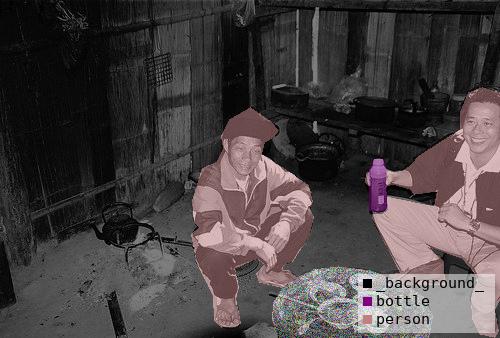
Reading the mask files#
The PNG masks contain only very low pixel values, such as 0, 4, 14, because those are class indices rather than brightnesses. The value 255 marks the __ignore__ label, which appears as -1 in the corresponding npy file.
Opening a mask in a normal image viewer therefore shows a near-black picture. Render one with the helper script from the tutorial example:
../tutorial/draw_label_png.py data_dataset_voc/SegmentationClass/2011_000003.png
../tutorial/draw_label_png.py data_dataset_voc/SegmentationObject/2011_000003.png
In code, open masks with PIL.Image.open — see reading annotations in Python.
Related#
- Export to COCO — one file instead of several directories
- Semantic segmentation
- Instance segmentation